引言
自然语言处理 (NLP) 领域的进展日新月异,你方唱罢我登场。因此,在实际场景中,针对特定的任务,我们经常需要对不同的语言模型进行比较,以寻找最适合的模型。本文主要比较 3 个模型: RoBERTa、Mistral-7B 及 Llama-2-7B。我们用它们来解决一个常见问题 —— 对灾难相关的推文进行分类。值得注意的是,Mistral 和 Llama 2 是 70 亿参数的大模型。相形之下,RoBERTa-large (355M 参数) 只是一个小模型,我们用它作为比较的基线。
本文,我们使用 PEFT (Parameter-Efficient Fine-Tuning,参数高效微调) 技术: LoRA (Low-Rank Adaptation,低秩适配) 来微调带序列分类任务头的预训练模型。LoRA 旨在显著减少可训参数量,同时保持强大的下游任务性能。
本文的主要目标是通过对 Hugging Face 的三个预训练模型进行 LoRA 微调,使之适用于序列分类任务。这三个预训练模型分别是: meta-llama/Llama-2-7b-hf、mistralai/Mistral-7B-v0.1 及 roberta-large。
使用的硬件
- 节点数: 1
- 每个节点的 GPU 数: 1
- GPU 类型: A6000
- GPU 显存: 48GB
目标
- 使用 LoRA PEFT 方法对预训练 LLM 进行微调。
- 了解如何使用 Hugging Face 的各种 API (transformers、peft 以及 datasets)。
- 使用 Weights & Biases 进行超参调优以及实验日志记录。
软件依赖
datasets
evaluate
peft
scikit-learn
torch
transformers
wandb
注意: 要准确重现本文结果,请注意确保软件版本与 wandb 报告 的一致。
预训练模型
RoBERTa
RoBERTa (Robustly Optimized BERT Approach) 是 Meta AI 研究团队提出的改进版 BERT 模型。BERT 是一种基于 transformer 的语言模型,其基于自注意力机制对单词进行上下文感知的表征,并基于掩码语言模型目标进行训练。请注意,BERT 作为编码器模型,仅可用于自然语言理解任务 (例如序列分类和词元分类)。
RoBERTa 是一种流行的可微调模型,很适合作为我们实验的基线。欲了解更多信息,你可以查阅其 Hugging Face 模型卡。
Llama 2
Llama 2 (Large Language Model Meta AI) 是 Meta AI 推出的一系列大语言模型 (LLM),其模型大小各异,参数量从 70 亿到 650 亿不等。
Llama 2 是一种基于 transformer 解码器架构的自回归语言模型。Llama 2 接受单词序列作为输入,并基于滑动窗口迭代预测下一个词元,从而实现文本生成的功能。
Llama 2 的架构与 GPT-3 等模型略有不同。举几个例子,Llama 2 采用 SwiGLU 激活函数而不是 ReLU,另外其位置嵌入使用的是旋转位置嵌入而不是可训绝对位置嵌入。
最近发布的 Llama 2 还对架构进行了改进,其将支持的最大上下文长度扩展到 4096 个词元,并使用分组查询注意 (grouped-query attention,GQA) 解码机制来更好地利用长序列。
Mistral 7B
Mistral 7B v0.1 有 73 亿个参数,是 Mistral AI 推出的第一个 LLM。
Mistral 7B 架构使用的新技术主要有:
- 滑窗注意力: 用基于滑动窗口的注意力替换完整注意力 (平方级计算成本),其中每个词元最多可以关注上一层的 4096 个词元 (线性计算成本)。这样,多层以后,Mistral 7B 的实际关注词元数会叠加,因此更高层的注意力实际关注的总历史词元数会超过 4096。
- 分组查询注意力: Llama 2 也使用了该技术,其通过缓存先前解码的词元的键向量和值向量来优化推理过程 (减少处理时间)。
LoRA
PEFT (Parameter Efficient Fine-Tuning,参数高效微调) 包含 p-tuning、前缀微调 (prefix-tuning) 、IA3、适配器微调以及 LoRA 等一系列技术,其旨在通过仅微调大模型的一个小参数集,就能达到全模型微调的性能水平。
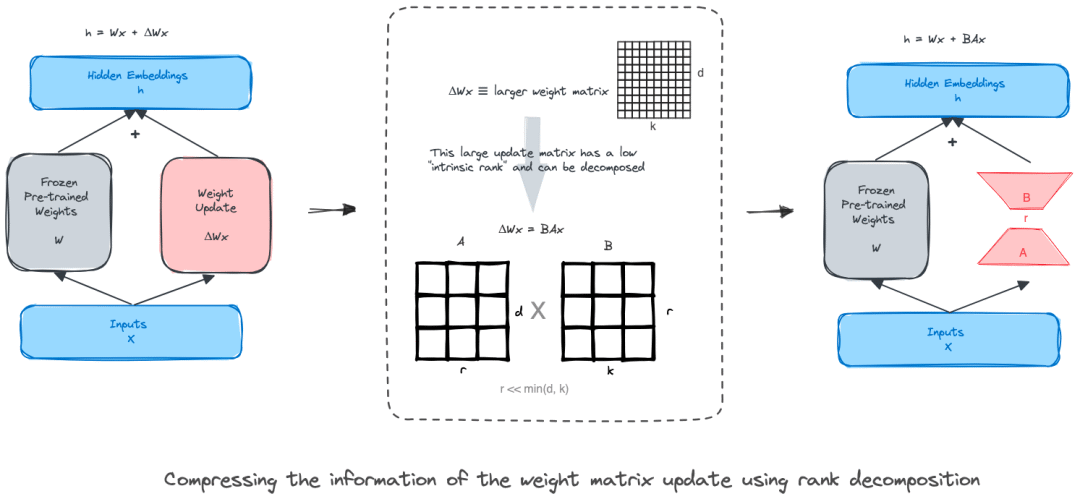
LoRA (Low-Rank Adaptation,低阶适配) 的方法与添加适配层类似。其主要目标是减少模型的可训参数量。LoRA 的主要做法是冻结预训练权重,仅更新一个新增的低秩矩阵。
环境设置
RoBERTa 支持的最大序列长度为 512,为公平起见,对所有模型,我们统一设定 MAX_LEN=512 。
MAX_LEN = 512
roberta_checkpoint = "roberta-large"
mistral_checkpoint = "mistralai/Mistral-7B-v0.1"
llama_checkpoint = "meta-llama/Llama-2-7b-hf"
数据准备
数据加载
从 Hugging Face 加载数据集:
from datasets import load_dataset
dataset = load_dataset("mehdiiraqui/twitter_disaster")
将数据集分为训练集和验证集,同时加载测试集:
from datasets import Dataset
# 将数据集的训练集划分为训练集和验证集
data = dataset['train'].train_test_split(train_size=0.8, seed=42)
# 把划分而得的测试集重命名为验证集
data['val'] = data.pop("test")
# 将原数据集的测试集仍作为测试集
data['test'] = dataset['test']
以下是数据集概览:
DatasetDict({
    train: Dataset({
        features: ['id', 'keyword', 'location', 'text', 'target'],
        num_rows: 6090
    })
    val: Dataset({
        features: ['id', 'keyword', 'location', 'text', 'target'],
        num_rows: 1523
    })
    test: Dataset({
        features: ['id', 'keyword', 'location', 'text', 'target'],
        num_rows: 3263
    })
})
首先,检查一下数据分布:
import pandas as pd
data[‘train’].to_pandas().info()
data[‘test’].to_pandas().info()
- 训练集
RangeIndex: 7613 entries, 0 to 7612
Data columns (total 5 columns):
 # Column Non-Null Count Dtype
--- ------ -------------- -----
 0 id 7613 non-null int64
 1 keyword 7552 non-null object
 2 location 5080 non-null object
 3 text 7613 non-null object
 4 target 7613 non-null int64
dtypes: int64(2), object(3)
memory usage: 297.5+ KB
- 测试集
<class 'pandas.core.frame.DataFrame'>
RangeIndex: 3263 entries, 0 to 3262
Data columns (total 5 columns):
 # Column Non-Null Count Dtype
--- ------ -------------- -----
 0 id 3263 non-null int64
 1 keyword 3237 non-null object
 2 location 2158 non-null object
 3 text 3263 non-null object
 4 target 3263 non-null int64
dtypes: int64(2), object(3)
memory usage: 127.6+ KB
训练集中标签分布情况:
target
0 4342
1 3271
Name: count, dtype: int64
由于类别不平衡,我们计算一下正负类权重,以用于稍后的损失计算:
pos_weights = len(data['train'].to_pandas()) / (2 * data['train'].to_pandas().target.value_counts()[1])
neg_weights = len(data['train'].to_pandas()) / (2 * data['train'].to_pandas().target.value_counts()[0])
计算出的权重为:
POS_WEIGHT, NEG_WEIGHT = (1.1637114032405993, 0.8766697374481806)
接着,我们计算文本序列的最大长度:
# 字符数
max_char = data['train'].to_pandas()['text'].str.len().max()
# 词数
max_words = data['train'].to_pandas()['text'].str.split().str.len().max()
The maximum number of characters is 152.
The maximum number of words is 31.
数据处理
以一条训练数据为例:
data['train'][0]{'id': 5285,
'keyword': 'fear',
'location': 'Thibodaux, LA',
'text': 'my worst fear. https://t.co/iH8UDz8mq3',
'target': 0}
该数据中包括关键字、位置和推文。为了简单起见,我们选择 text 特征作为 LLM 的唯一输入。
本阶段的目标是为 LLM 微调准备所需的 Hugging Face 格式的训练集、验证集和测试集。然后是定义用于训练的词元数据集,使用合适的分词器将 text 特征转换为词元 id 和注意力掩码序列这两个张量。由于每个模型都有其特定的分词器,因此我们需要生成三个不同的数据集,每个模型一个。
我们首先定义 RoBERTa 模型的数据加载器:
- 加载与分词:
from transformers import AutoTokenizer
roberta_tokenizer = AutoTokenizer.from_pretrained(roberta_checkpoint, add_prefix_space=True)
注意: RoBERTa 分词器经过训练已将空格视为词元的一部分。因此,如果句子的第一个单词前面没有空格,则其编码会有所不同。为了确保第一个单词包含空格,我们设置 add_prefix_space=True 。同时,为了保持三个模型的预处理一致,我们将 Llama 2 和 Mistral 7B 的相应参数也设为 True 。
- 定义每条数据的预处理函数:
def roberta_preprocessing_function(examples):
    return roberta_tokenizer(examples['text'], truncation=True, max_length=MAX_LEN)
将预处理函数应用于训练数据集的第一条数据,我们得到了分词后的输入 ( input_ids ) 及其注意力掩码:
roberta_preprocessing_function(data['train'][0]){'input_ids': [0, 127, 2373, 2490, 4, 1205, 640, 90, 4, 876, 73, 118, 725, 398, 13083, 329, 398, 119, 1343, 246, 2], 'attention_mask': [1, 1, 1, 1, 1, 1, 1, 1, 1, 1, 1, 1, 1, 1, 1, 1, 1, 1, 1, 1, 1]}
- 现在,将预处理函数应用于整个数据集:
col_to_delete = ['id', 'keyword','location', 'text']
# 删除不需要的列,并应用预处理函数
roberta_tokenized_datasets = data.map(roberta_preprocessing_function, batched=True, remove_columns=col_to_delete)
# 按照 HuggingFace 的要求,将 `target` 列  重命名为 `label` 列
roberta_tokenized_datasets = roberta_tokenized_datasets.rename_column("target", "label")
# 数据集格式设为 "torch"
roberta_tokenized_datasets.set_format("torch")
注意: 我们从数据中删除了不需要的列: id 、 keyword 、 location 及 text 。删除 text 的原因是我们已经将其转换为输入 id 和注意力掩码:
分词后的训练数据集中的数据如下:
roberta_tokenized_datasets['train'][0]{'label': tensor(0),
'input_ids': tensor([ 0, 127, 2373, 2490, 4, 1205, 640, 90, 4, 876,
73, 118, 725, 398, 13083, 329, 398, 119, 1343, 246,
2]),
'attention_mask': tensor([1, 1, 1, 1, 1, 1, 1, 1, 1, 1, 1, 1, 1, 1, 1, 1, 1, 1, 1, 1, 1])}
- 为了生成训练 batch 数据,我们还需要对给定 batch 中的序列进行填充,以使 batch 中所有序列的长度都等于本 batch 最长序列的长度。为此,我们使用了
DataCollatorWithPadding类:
# 数据整理器将所有数据统一填充至 batch 内最长序列的长度
from transformers import DataCollatorWithPadding
roberta_data_collator = DataCollatorWithPadding(tokenizer=roberta_tokenizer)
用相同的流程为 Mistral 7B 和 Llama 2 模型准备数据:
注意 Llama 2 和 Mistral 7B 没有默认的 pad_token_id ,我们将其设为 eos_token_id 。
- Mistral 7B:
# 加载 Mistral 7B 分词器
from transformers import AutoTokenizer, DataCollatorWithPadding
mistral_tokenizer = AutoTokenizer.from_pretrained(mistral_checkpoint, add_prefix_space=True)
mistral_tokenizer.pad_token_id = mistral_tokenizer.eos_token_id
mistral_tokenizer.pad_token = mistral_tokenizer.eos_token
def mistral_preprocessing_function(examples):
return mistral_tokenizer(examples[‘text’], truncation=True, max_length=MAX_LEN)
mistral_tokenized_datasets = data.map(mistral_preprocessing_function, batched=True, remove_columns=col_to_delete)
mistral_tokenized_datasets = mistral_tokenized_datasets.rename_column(“target”, “label”)
mistral_tokenized_datasets.set_format(“torch”)
# 序列填充
mistral_data_collator = DataCollatorWithPadding(tokenizer=mistral_tokenizer)
- Llama 2:
# 加载 Llama 2 分词器
from transformers import AutoTokenizer, DataCollatorWithPadding
llama_tokenizer = AutoTokenizer.from_pretrained(llama_checkpoint, add_prefix_space=True)
llama_tokenizer.pad_token_id = llama_tokenizer.eos_token_id
llama_tokenizer.pad_token = llama_tokenizer.eos_token
def llama_preprocessing_function(examples):
return llama_tokenizer(examples[‘text’], truncation=True, max_length=MAX_LEN)
llama_tokenized_datasets = data.map(llama_preprocessing_function, batched=True, remove_columns=col_to_delete)
llama_tokenized_datasets = llama_tokenized_datasets.rename_column(“target”, “label”)
llama_tokenized_datasets.set_format(“torch”)
# 序列填充
llama_data_collator = DataCollatorWithPadding(tokenizer=llama_tokenizer)
至此,我们已经准备好了分词后的数据集,下一节我们将讨论如何加载预训练 LLM 检查点以及如何设置 LoRA 权重。
模型
RoBERTa
为分类任务加载 RoBERTa 检查点
我们使用 Hugging Face AutoModelForSequenceClassification 类加载带有序列分类头的预训练 RoBERTa 模型:
from transformers import AutoModelForSequenceClassification
roberta_model = AutoModelForSequenceClassification.from_pretrained(roberta_checkpoint, num_labels=2)
RoBERTa 分类器的 LoRA 设置
我们为 RoBERTa 分类器设置 LoRA 参数:
- TaskType: 序列分类
- r(rank): 分解矩阵的秩
- lora_alpha: 用于对习得权重进行缩放的 alpha 参数。LoRA 论文建议将 alpha 固定为 16
- lora_dropout: LoRA 层的 Dropout 概率
- bias: 是否向 LoRA 层添加偏置
以下代码使用了 LoRA 论文 的推荐设置。后文 我们还将用 wandb 对这些超参进行调优。
from peft import get_peft_model, LoraConfig, TaskType
roberta_peft_config = LoraConfig(
    task_type=TaskType.SEQ_CLS, r=2, lora_alpha=16, lora_dropout=0.1, bias="none",
)
roberta_model = get_peft_model(roberta_model, roberta_peft_config)
roberta_model.print_trainable_parameters()
可以看到,可训参数量仅占 RoBERTa 模型参数量的 0.64%:
trainable params: 2,299,908 || all params: 356,610,052 || trainable%: 0.6449363911929212
Mistral
为分类任务加载检查点
加载带有序列分类头的预训练 Mistral-7B 模型:
from transformers import AutoModelForSequenceClassification
import torch
mistral_model =  AutoModelForSequenceClassification.from_pretrained(
  pretrained_model_name_or_path=mistral_checkpoint,
  num_labels=2,
  device_map="auto"
)
设置填充词元 id,因为 Mistral 7B 没有默认填充词元。
mistral_model.config.pad_token_id = mistral_model.config.eos_token_id
Mistral 7B 分类器的 LoRA 设置
对 Mistral 7B 模型而言,我们需要指定 target_modules (我们将其指定为注意力模块的查询向量映射层和值向量映射层):
from peft import get_peft_model, LoraConfig, TaskType
mistral_peft_config = LoraConfig(
task_type=TaskType.SEQ_CLS, r=2, lora_alpha=16, lora_dropout=0.1, bias=“none”,
target_modules=[
“q_proj”,
“v_proj”,
],
)
mistral_model = get_peft_model(mistral_model, mistral_peft_config)
mistral_model.print_trainable_parameters()
可训参数量仅占 Mistral 模型参数量的 0.024%:
trainable params: 1,720,320 || all params: 7,112,380,416 || trainable%: 0.02418768259540745
Llama 2
为分类任务加载检查点
加载带有序列分类头的预训练 Llama 2 模型。
from transformers import AutoModelForSequenceClassification
import torch
llama_model =  AutoModelForSequenceClassification.from_pretrained(
  pretrained_model_name_or_path=llama_checkpoint,
  num_labels=2,
  device_map="auto",
  offload_folder="offload",
  trust_remote_code=True
)
设置填充词元 id,因为 Llama 2 没有默认填充词元。
llama_model.config.pad_token_id = llama_model.config.eos_token_id
Llama 2 分类器的 LoRA 设置
使用与 Mistral 相同的 LoRA 参数:
from peft import get_peft_model, LoraConfig, TaskType
llama_peft_config = LoraConfig(
    task_type=TaskType.SEQ_CLS, r=16, lora_alpha=16, lora_dropout=0.05, bias="none",
    target_modules=[
        "q_proj",
        "v_proj",
    ],
)
llama_model = get_peft_model(llama_model, llama_peft_config)
llama_model.print_trainable_parameters()
可训参数量仅占 Llama 2 模型参数量的 0.12%:
trainable params: 8,404,992 || all params: 6,615,748,608 || trainable%: 0.1270452143516515
至此,我们定义了用于训练的词元数据集及 LoRA 设置。下面,我们介绍如何使用 Hugging Face 的 Trainer 类启动训练。
设置 Trainer
评估指标
首先,我们定义用于对三个模型的性能进行比较的指标: F1 分数、召回率、精确度和准确度:
import evaluate
import numpy as np
def compute_metrics(eval_pred):
# HF `evaluate` 包已支持我们所要的所有指标
precision_metric = evaluate.load(“precision”)
recall_metric = evaluate.load(“recall”)
f1_metric= evaluate.load(“f1”)
accuracy_metric = evaluate.load(“accuracy”)
logits, labels = eval_pred
# eval_pred 是模型返回的预测值和实际值元组
predictions = np.argmax(logits, axis=-1)
precision = precision_metric.compute(predictions=predictions, references=labels)[“precision”]
recall = recall_metric.compute(predictions=predictions, references=labels)[“recall”]
f1 = f1_metric.compute(predictions=predictions, references=labels)[“f1”]
accuracy = accuracy_metric.compute(predictions=predictions, references=labels)[“accuracy”]
# `Trainer` 要求将指标组织为一个字典,其键为指标名,值为分数。
return {“precision”: precision, “recall”: recall, “f1-score”: f1, ‘accuracy’: accuracy}
基于加权损失的自定义 Trainer
前文提到,数据集正负类分布并不平衡。因此,我们用加权交叉熵损失来训练模型以解决这个问题。Trainer 类本身的实现中不支持自定义损失,因为它期望直接从模型的输出中获取损失。
因此,我们需要定义一个自定义的 WeightedCELossTrainer ,以重写 compute_loss 方法,该方法可以根据模型的预测和标签计算加权交叉熵损失:
from transformers import Trainer
class WeightedCELossTrainer(Trainer):
def compute_loss(self, model, inputs, return_outputs=False):
labels = inputs.pop(“labels”)
# Get model’s predictions
outputs = model(**inputs)
logits = outputs.get(“logits”)
# Compute custom loss
loss_fct = torch.nn.CrossEntropyLoss(weight=torch.tensor([neg_weights, pos_weights], device=model.device, dtype=logits.dtype))
loss = loss_fct(logits.view(-1, self.model.config.num_labels), labels.view(-1))
return (loss, outputs) if return_outputs else loss
Trainer 设置
我们为三个模型分别设置训练超参及训练器。
RoBERTa
第一步,把模型搬到 GPU 设备上。
roberta_model = roberta_model.cuda()
roberta_model.device()
It will print the following:
device(type='cuda', index=0)
然后,设置训练超参:
from transformers import TrainingArguments
lr = 1e-4
batch_size = 8
num_epochs = 5
training_args = TrainingArguments(
output_dir=“roberta-large-lora-token-classification”,
learning_rate=lr,
lr_scheduler_type= “constant”,
warmup_ratio= 0.1,
max_grad_norm= 0.3,
per_device_train_batch_size=batch_size,
per_device_eval_batch_size=batch_size,
num_train_epochs=num_epochs,
weight_decay=0.001,
evaluation_strategy=“epoch”,
save_strategy=“epoch”,
load_best_model_at_end=True,
report_to=“wandb”,
fp16=False,
gradient_checkpointing=True,
)
最后,我们将模型、训练超参和词元数据集一起作为参数来实例化一个 RoBERTa 训练器:
roberta_trainer = WeightedCELossTrainer(
    model=roberta_model,
    args=training_args,
    train_dataset=roberta_tokenized_datasets['train'],
    eval_dataset=roberta_tokenized_datasets["val"],
    data_collator=roberta_data_collator,
    compute_metrics=compute_metrics
)
Mistral-7B
与 RoBERTa 类似,我们用如下代码初始化 WeightedCELossTrainer :
from transformers import TrainingArguments, Trainer
mistral_model = mistral_model.cuda()
lr = 1e-4
batch_size = 8
num_epochs = 5
training_args = TrainingArguments(
output_dir=“mistral-lora-token-classification”,
learning_rate=lr,
lr_scheduler_type= “constant”,
warmup_ratio= 0.1,
max_grad_norm= 0.3,
per_device_train_batch_size=batch_size,
per_device_eval_batch_size=batch_size,
num_train_epochs=num_epochs,
weight_decay=0.001,
evaluation_strategy=“epoch”,
save_strategy=“epoch”,
load_best_model_at_end=True,
report_to=“wandb”,
fp16=True,
gradient_checkpointing=True,
)
mistral_trainer = WeightedCELossTrainer(
model=mistral_model,
args=training_args,
train_dataset=mistral_tokenized_datasets[‘train’],
eval_dataset=mistral_tokenized_datasets[“val”],
data_collator=mistral_data_collator,
compute_metrics=compute_metrics
)
注意,我们需要将 fp16 设为 True 以启用半精度训练。主要原因是 Mistral-7B 很大,如果使用 fp32 精度,其权重无法放进单块 GPU 的显存 (48GB) 中。
Llama 2
与 Mistral 7B 类似,我们用如下代码定义训练器:
from transformers import TrainingArguments, Trainer
llama_model = llama_model.cuda()
lr = 1e-4
batch_size = 8
num_epochs = 5
training_args = TrainingArguments(
output_dir=“llama-lora-token-classification”,
learning_rate=lr,
lr_scheduler_type= “constant”,
warmup_ratio= 0.1,
max_grad_norm= 0.3,
per_device_train_batch_size=batch_size,
per_device_eval_batch_size=batch_size,
num_train_epochs=num_epochs,
weight_decay=0.001,
evaluation_strategy=“epoch”,
save_strategy=“epoch”,
load_best_model_at_end=True,
report_to=“wandb”,
fp16=True,
gradient_checkpointing=True,
)
llama_trainer = WeightedCELossTrainer(
model=llama_model,
args=training_args,
train_dataset=llama_tokenized_datasets[‘train’],
eval_dataset=llama_tokenized_datasets[“val”],
data_collator=llama_data_collator,
compute_metrics=compute_metrics
)
超参调优
我们用 Wandb Sweep API 通过贝叶斯搜索策略来进行超参调优 (30 次运行),待调优的超参搜索空间如下:
方法指标lora_alphalora_biaslora_dropoutlora_ranklrmax_lengthbayes目标: maximize分布: categorical分布: categorical分布: uniform分布: categorical分布: uniform分布: categorical
目标名: eval/f1-score取值集合:
-16
-32
-64取值集合: None-最大值: 0.1
-最小值: 0取值集合:
-4
-8
-16
-32-最大值: 2e-04
-最小值: 1e-05取值集合: 512
欲了解更多信息,可以查看 资源 一节中的 Wandb 实验报告。
结果
模型F1 分数训练时间内存消耗可训参数量RoBERTa0.8077538 秒GPU1: 9.1 GB
GPU2: 8.3 GB0.64%Mistral 7B0.73642030 秒GPU1: 29.6 Gb
GPU2: 29.5 GB0.024%Llama 20.76382052 秒GPU1: 35 GB
GPU2: 33.9 GB0.12%
总结
本文我们用 LoRA 对三个大语言模型 (LLM) (RoBERTa、Mistral 7B 及 Llama 2) 针对灾难推文分类任务进行微调。从性能结果来看,RoBERTa 的性能大幅优于 Mistral 7B 和 Llama 2。这就提出了一个问题: 我们是否真的需要一个大而复杂的 LLM 来完成诸如短序列二分类这样的简单任务?
一个重要的启示是,在选择要使用的 LLM 模型时应该考虑具体的项目要求、可用资源和性能需求。
此外,对于针对短序列的相对 简单 的预测任务,小的基础模型 (例如 RoBERTa) 仍然具有竞争力。
最后,我们还通过例子展示了 LoRA 方法的通用性,其既可应用于编码器 (RoBERTa) 模型,还可应用于解码器 (Llama 2 及 Mistral 7B) 模型。
资源
- 本文代码均已在该 Github 项目。
- 下面是各模型的 Wandb 超参调优实验报告:
- RoBERTa
- Mistral 7B
- Llama 2
🤗 宝子们可以戳 阅读原文 查看文中所有的外部链接哟!
英文原文: https://hf.co/blog/Lora-for-sequence-classification-with-Roberta-Llama-Mistral
原文作者: Mehdi Iraqi
译者: Matrix Yao (姚伟峰),英特尔深度学习工程师,工作方向为 transformer-family 模型在各模态数据上的应用及大规模模型的训练推理。



 ufabet
มีเกมให้เลือกเล่นมากมาย: เกมเดิมพันหลากหลาย ครบทุกค่ายดัง
ufabet
มีเกมให้เลือกเล่นมากมาย: เกมเดิมพันหลากหลาย ครบทุกค่ายดัง
 tornado crypto mixer
Discover the power of privacy with TornadoCash! Learn how this decentralized mixer ensures your transactions remain confidential.
tornado crypto mixer
Discover the power of privacy with TornadoCash! Learn how this decentralized mixer ensures your transactions remain confidential.
 ดูบอลสด
Very well presented. Every quote was awesome and thanks for sharing the content. Keep sharing and keep motivating others.
ดูบอลสด
Very well presented. Every quote was awesome and thanks for sharing the content. Keep sharing and keep motivating others.
 ดูบอลสด
Pretty! This has been a really wonderful post. Many thanks for providing these details.
ดูบอลสด
Pretty! This has been a really wonderful post. Many thanks for providing these details.
 ดูบอลสด
Pretty! This has been a really wonderful post. Many thanks for providing these details.
ดูบอลสด
Pretty! This has been a really wonderful post. Many thanks for providing these details.
 ดูบอลสด
Hi there to all, for the reason that I am genuinely keen of reading this website’s post to be updated on a regular basis. It carries pleasant stuff.
ดูบอลสด
Hi there to all, for the reason that I am genuinely keen of reading this website’s post to be updated on a regular basis. It carries pleasant stuff.
 Obrazy Sztuka Nowoczesna
Thank you for this wonderful contribution to the topic. Your ability to explain complex ideas simply is admirable.
Obrazy Sztuka Nowoczesna
Thank you for this wonderful contribution to the topic. Your ability to explain complex ideas simply is admirable.
 ufabet
Hi there to all, for the reason that I am genuinely keen of reading this website’s post to be updated on a regular basis. It carries pleasant stuff.
ufabet
Hi there to all, for the reason that I am genuinely keen of reading this website’s post to be updated on a regular basis. It carries pleasant stuff.
 ufabet
Very well presented. Every quote was awesome and thanks for sharing the content. Keep sharing and keep motivating others.
ufabet
Very well presented. Every quote was awesome and thanks for sharing the content. Keep sharing and keep motivating others.