This notebook illustrates how to build an text-image search engine from scratch using Milvus. Milvus is the most advanced open-source vector database built for AI applications and supports nearest neighbor embedding search across tens of millions of entries. We’ll go through text-image search procedures and evaluate the performance. Moreover, we managed to make the core functionality as simple as a dozen lines of code, with which you can start hacking your own image search engine.
Preparation
Install Dependencies
First we need to install dependencies such as towhee, gradio and opencv-python.
In [1]:! python -m pip install -q towhee gradio opencv-python
Prepare the data
The dataset used in this demo is a subset of the ImageNet dataset (100 classes, 10 images for each class), and the dataset is available via Github.
The dataset is organized as follows:
- train: directory of candidate images;
- test: directory of test images;
- reverse_image_search.csv: a csv file containing an id, path, and label for each image;
Let’s take a quick look:
In [2]:! curl -L https://github.com/towhee-io/examples/releases/download/data/reverse_image_search.zip -O ! unzip -q -o reverse_image_search.zip % Total % Received % Xferd Average Speed Time Time Time Current Dload Upload Total Spent Left Speed 0 0 0 0 0 0 0 0 –:–:– 0:00:01 –:–:– 0 100 119M 100 119M 0 0 8071k 0 0:00:15 0:00:15 –:–:– 10.6M
In [3]:import pandas as pd df = pd.read_csv(‘reverse_image_search.csv’) df.head()
Out[3]:
| id | path | label | |
|---|---|---|---|
| 0 | 0 | ./train/brain_coral/n01917289_1783.JPEG | brain_coral |
| 1 | 1 | ./train/brain_coral/n01917289_4317.JPEG | brain_coral |
| 2 | 2 | ./train/brain_coral/n01917289_765.JPEG | brain_coral |
| 3 | 3 | ./train/brain_coral/n01917289_1079.JPEG | brain_coral |
| 4 | 4 | ./train/brain_coral/n01917289_2484.JPEG | brain_coral |
To use the dataset for text-image search, let’s first define some helper function:
- read_images(results): read images by image IDs;
In [4]:import cv2 from towhee.types.image import Image id_img = df.set_index(‘id’)[‘path’].to_dict() def read_images(results): imgs = [] for re in results: path = id_img[re.id] imgs.append(Image(cv2.imread(path), ‘BGR’)) return imgs
Create a Milvus Collection
Before getting started, please make sure that you have started a Milvus service. This notebook uses milvus 2.2.10 and pymilvus 2.2.11.
In [ ]:! python -m pip install -q pymilvus==2.2.11
Let’s first create a text_image_search collection that uses the L2 distance metric and an IVF_FLAT index.
In [5]:from pymilvus import connections, FieldSchema, CollectionSchema, DataType, Collection, utility def create_milvus_collection(collection_name, dim): connections.connect(host=‘127.0.0.1’, port=‘19530’) if utility.has_collection(collection_name): utility.drop_collection(collection_name) fields = [ FieldSchema(name=‘id’, dtype=DataType.INT64, descrition=‘ids’, is_primary=True, auto_id=False), FieldSchema(name=’embedding’, dtype=DataType.FLOAT_VECTOR, descrition=’embedding vectors’, dim=dim) ] schema = CollectionSchema(fields=fields, description=‘text image search’) collection = Collection(name=collection_name, schema=schema) # create IVF_FLAT index for collection. index_params = { ‘metric_type’:’L2′, ‘index_type’:”IVF_FLAT”, ‘params’:{“nlist”:512} } collection.create_index(field_name=“embedding”, index_params=index_params) return collection collection = create_milvus_collection(‘text_image_search’, 512)
Text Image Search
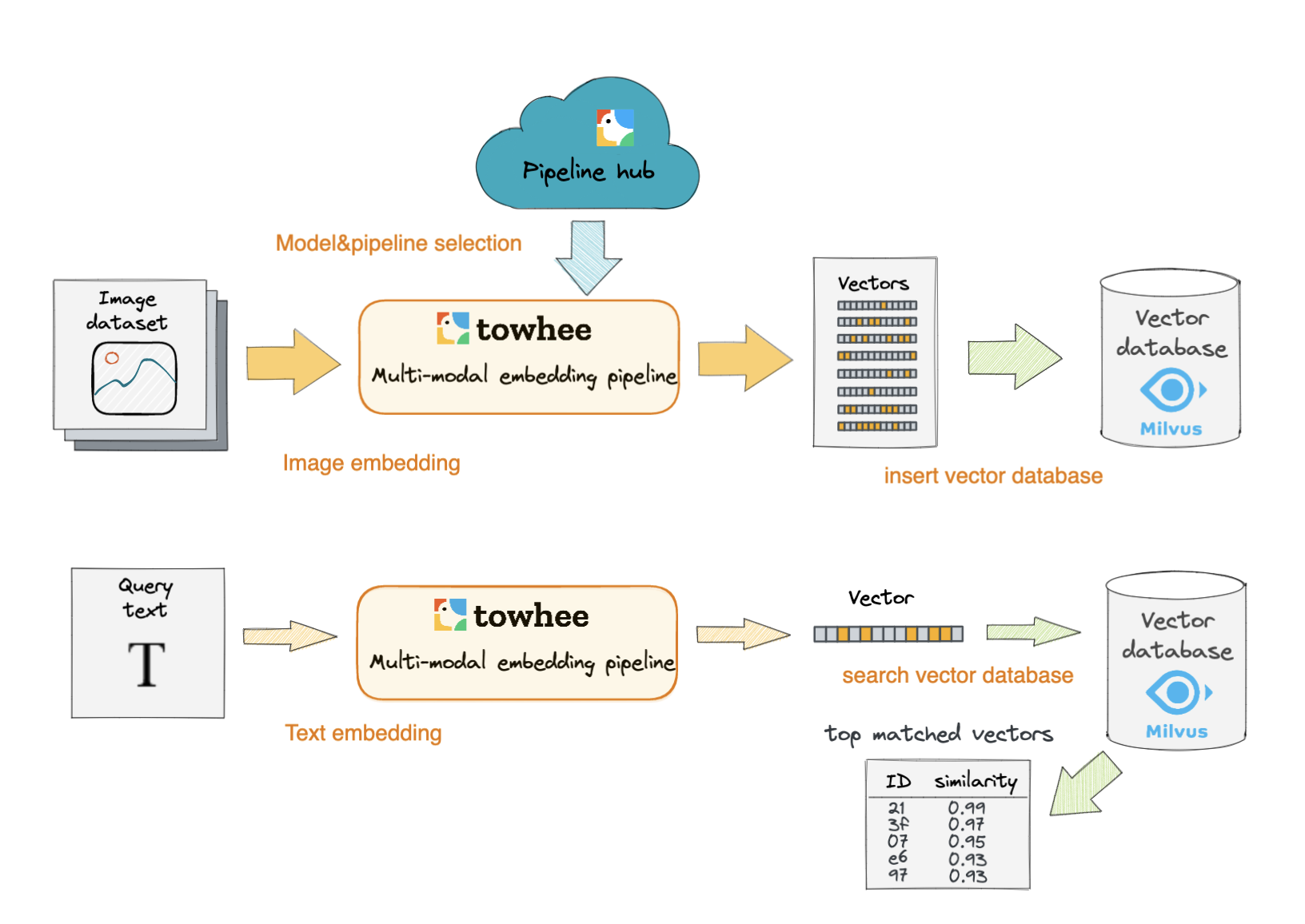
In this section, we’ll show how to build our text-image search engine using Milvus. The basic idea behind our text-image search is the extract embeddings from images and texts using a deep neural network and compare the embeddings with those stored in Milvus.
We use Towhee, a machine learning framework that allows for creating data processing pipelines, and it also provides predefined operators which implement insert and query operation in Milvus.
Generate image and text embeddings with CLIP
This operator extracts features for image or text with CLIP which can generate embeddings for text and image by jointly training an image encoder and text encoder to maximize the cosine similarity.
In [6]:from towhee import ops, pipe, DataCollection import numpy as np
In [7]:p = ( pipe.input(‘path’) .map(‘path’, ‘img’, ops.image_decode.cv2(‘rgb’)) .map(‘img’, ‘vec’, ops.image_text_embedding.clip(model_name=‘clip_vit_base_patch16’, modality=‘image’)) .map(‘vec’, ‘vec’, lambda x: x / np.linalg.norm(x)) .output(‘img’, ‘vec’) ) DataCollection(p(‘./teddy.png’)).show() 2023-06-12 14:54:53,081 – 140406106779840 – connectionpool.py-connectionpool:1003 – DEBUG: Starting new HTTPS connection (1): huggingface.co:443 2023-06-12 14:54:54,529 – 140406106779840 – connectionpool.py-connectionpool:456 – DEBUG: https://huggingface.co:443 “HEAD /openai/clip-vit-base-patch16/resolve/main/config.json HTTP/1.1” 200 0 2023-06-12 14:54:56,725 – 140406106779840 – connectionpool.py-connectionpool:456 – DEBUG: https://huggingface.co:443 “HEAD /openai/clip-vit-base-patch16/resolve/main/vocab.json HTTP/1.1” 200 0 2023-06-12 14:54:57,253 – 140406106779840 – connectionpool.py-connectionpool:456 – DEBUG: https://huggingface.co:443 “HEAD /openai/clip-vit-base-patch16/resolve/main/preprocessor_config.json HTTP/1.1” 200 0 2023-06-12 14:54:57,544 – 140406106779840 – connectionpool.py-connectionpool:456 – DEBUG: https://huggingface.co:443 “HEAD /openai/clip-vit-base-patch16/resolve/main/tokenizer_config.json HTTP/1.1” 200 0 2023-06-12 14:54:57,626 – 140397301311232 – node.py-node:167 – INFO: Begin to run Node-_input 2023-06-12 14:54:57,629 – 140397301311232 – node.py-node:167 – INFO: Begin to run Node-image-decode/cv2-0 2023-06-12 14:54:57,630 – 140397292918528 – node.py-node:167 – INFO: Begin to run Node-image-text-embedding/clip-1 2023-06-12 14:54:57,631 – 140397284525824 – node.py-node:167 – INFO: Begin to run Node-lambda-2 2023-06-12 14:54:57,633 – 140397276133120 – node.py-node:167 – INFO: Begin to run Node-_output 2023-06-12 14:54:57,814 – 140406106779840 – __init__.py-__init__:307 – DEBUG: matplotlib data path: /home/junjie.jiangjjj/anaconda3/envs/py39/lib/python3.9/site-packages/matplotlib/mpl-data 2023-06-12 14:54:57,821 – 140406106779840 – __init__.py-__init__:307 – DEBUG: CONFIGDIR=/home/junjie.jiangjjj/.config/matplotlib 2023-06-12 14:54:57,823 – 140406106779840 – __init__.py-__init__:1475 – DEBUG: interactive is False 2023-06-12 14:54:57,824 – 140406106779840 – __init__.py-__init__:1476 – DEBUG: platform is linux 2023-06-12 14:54:57,877 – 140406106779840 – __init__.py-__init__:307 – DEBUG: CACHEDIR=/home/junjie.jiangjjj/.cache/matplotlib 2023-06-12 14:54:57,880 – 140406106779840 – font_manager.py-font_manager:1540 – DEBUG: Using fontManager instance from /home/junjie.jiangjjj/.cache/matplotlib/fontlist-v330.json 2023-06-12 14:54:58,069 – 140406106779840 – pyplot.py-pyplot:339 – DEBUG: Loaded backend module://matplotlib_inline.backend_inline version unknown. 2023-06-12 14:54:58,070 – 140406106779840 – pyplot.py-pyplot:339 – DEBUG: Loaded backend module://matplotlib_inline.backend_inline version unknown.
| img | vec |
|---|---|
| [0.037240546, -0.065988705, -0.010860455, …] shape=(512,) |
<Figure size 128×128 with 0 Axes>
In [8]:p2 = ( pipe.input(‘text’) .map(‘text’, ‘vec’, ops.image_text_embedding.clip(model_name=‘clip_vit_base_patch16’, modality=‘text’)) .map(‘vec’, ‘vec’, lambda x: x / np.linalg.norm(x)) .output(‘text’, ‘vec’) ) DataCollection(p2(“A teddybear on a skateboard in Times Square.”)).show() 2023-06-12 14:55:03,300 – 140406106779840 – connectionpool.py-connectionpool:456 – DEBUG: https://huggingface.co:443 “HEAD /openai/clip-vit-base-patch16/resolve/main/config.json HTTP/1.1” 200 0 2023-06-12 14:55:05,445 – 140406106779840 – connectionpool.py-connectionpool:456 – DEBUG: https://huggingface.co:443 “HEAD /openai/clip-vit-base-patch16/resolve/main/vocab.json HTTP/1.1” 200 0 2023-06-12 14:55:05,830 – 140406106779840 – connectionpool.py-connectionpool:456 – DEBUG: https://huggingface.co:443 “HEAD /openai/clip-vit-base-patch16/resolve/main/preprocessor_config.json HTTP/1.1” 200 0 2023-06-12 14:55:06,123 – 140406106779840 – connectionpool.py-connectionpool:456 – DEBUG: https://huggingface.co:443 “HEAD /openai/clip-vit-base-patch16/resolve/main/tokenizer_config.json HTTP/1.1” 200 0 2023-06-12 14:55:06,205 – 140396121286400 – node.py-node:167 – INFO: Begin to run Node-_input 2023-06-12 14:55:06,207 – 140396121286400 – node.py-node:167 – INFO: Begin to run Node-image-text-embedding/clip-0 2023-06-12 14:55:06,211 – 140394427840256 – node.py-node:167 – INFO: Begin to run Node-lambda-1 2023-06-12 14:55:06,211 – 140394419447552 – node.py-node:167 – INFO: Begin to run Node-_output
| text | vec |
|---|---|
| A teddybear on a skateboard in Times Square. | [-0.0086854, 0.02717687, -0.0007425508, …] shape=(512,) |
Here is detailed explanation of the code:
map('path', 'img', ops.image_decode.cv2_rgb('rgb')): for each row from the data, read and decode the image atpathand put the pixel data into columnimg;map('img', 'vec', ops.image_text_embedding.clip(model_name='clip_vit_base_patch16',modality='image'/'text'): extract image or text embedding feature withops.image_text_embedding.clip, an operator from the Towhee hub . This operator supports seveal models includingclip_vit_base_patch16,clip_vit_base_patch32,clip_vit_large_patch14,clip_vit_large_patch14_336,etc.
Load Image Embeddings into Milvus
We first extract embeddings from images with clip_vit_base_patch16 model and insert the embeddings into Milvus for indexing. Towhee provides a method-chaining style API so that users can assemble a data processing pipeline with operators.
In [18]:%%time collection = create_milvus_collection(‘text_image_search’, 512) def read_csv(csv_path, encoding=‘utf-8-sig’): import csv with open(csv_path, ‘r’, encoding=encoding) as f: data = csv.DictReader(f) for line in data: yield int(line[‘id’]), line[‘path’] p3 = ( pipe.input(‘csv_file’) .flat_map(‘csv_file’, (‘id’, ‘path’), read_csv) .map(‘path’, ‘img’, ops.image_decode.cv2(‘rgb’)) .map(‘img’, ‘vec’, ops.image_text_embedding.clip(model_name=‘clip_vit_base_patch16’, modality=‘image’, device=0)) .map(‘vec’, ‘vec’, lambda x: x / np.linalg.norm(x)) .map((‘id’, ‘vec’), (), ops.ann_insert.milvus_client(host=‘127.0.0.1’, port=‘19530’, collection_name=‘text_image_search’)) .output() ) ret = p3(‘reverse_image_search.csv’) 2023-06-12 16:16:47,531 – 140406106779840 – connectionpool.py-connectionpool:273 – DEBUG: Resetting dropped connection: huggingface.co 2023-06-12 16:16:48,943 – 140406106779840 – connectionpool.py-connectionpool:456 – DEBUG: https://huggingface.co:443 “HEAD /openai/clip-vit-base-patch16/resolve/main/config.json HTTP/1.1” 200 0 2023-06-12 16:16:51,909 – 140406106779840 – connectionpool.py-connectionpool:456 – DEBUG: https://huggingface.co:443 “HEAD /openai/clip-vit-base-patch16/resolve/main/vocab.json HTTP/1.1” 200 0 2023-06-12 16:16:52,316 – 140406106779840 – connectionpool.py-connectionpool:456 – DEBUG: https://huggingface.co:443 “HEAD /openai/clip-vit-base-patch16/resolve/main/preprocessor_config.json HTTP/1.1” 200 0 2023-06-12 16:16:52,605 – 140406106779840 – connectionpool.py-connectionpool:456 – DEBUG: https://huggingface.co:443 “HEAD /openai/clip-vit-base-patch16/resolve/main/tokenizer_config.json HTTP/1.1” 200 0 2023-06-12 16:16:52,733 – 140381920413440 – node.py-node:167 – INFO: Begin to run Node-_input 2023-06-12 16:16:52,748 – 140381912020736 – node.py-node:167 – INFO: Begin to run Node-read_csv-0 2023-06-12 16:16:52,750 – 140402136966912 – node.py-node:167 – INFO: Begin to run Node-image-decode/cv2-1 2023-06-12 16:16:52,750 – 140381920413440 – node.py-node:167 – INFO: Begin to run Node-image-text-embedding/clip-2 2023-06-12 16:16:52,752 – 140386089555712 – node.py-node:167 – INFO: Begin to run Node-lambda-3 2023-06-12 16:16:52,753 – 140393303758592 – node.py-node:167 – INFO: Begin to run Node-ann-insert/milvus-client-4 2023-06-12 16:16:52,755 – 140393043715840 – node.py-node:167 – INFO: Begin to run Node-_output CPU times: user 1min 5s, sys: 46.7 s, total: 1min 52s Wall time: 28.6 s
In [11]:collection.load()
In [12]:print(‘Total number of inserted data is {}.’.format(collection.num_entities)) Total number of inserted data is 0.
Query Matched Images from Milvus
Now that embeddings for candidate images have been inserted into Milvus, we can query across it for nearest neighbors. Again, we use Towhee to load the input Text, compute an embedding vector, and use the vector as a query for Milvus. Because Milvus only outputs image IDs and distance values, we provide a read_images function to get the original image based on IDs and display.
In [13]:import pandas as pd import cv2 def read_image(image_ids): df = pd.read_csv(‘reverse_image_search.csv’) id_img = df.set_index(‘id’)[‘path’].to_dict() imgs = [] decode = ops.image_decode.cv2(‘rgb’) for image_id in image_ids: path = id_img[image_id] imgs.append(decode(path)) return imgs p4 = ( pipe.input(‘text’) .map(‘text’, ‘vec’, ops.image_text_embedding.clip(model_name=‘clip_vit_base_patch16’, modality=‘text’)) .map(‘vec’, ‘vec’, lambda x: x / np.linalg.norm(x)) .map(‘vec’, ‘result’, ops.ann_search.milvus_client(host=‘127.0.0.1’, port=‘19530’, collection_name=‘text_image_search’, limit=5)) .map(‘result’, ‘image_ids’, lambda x: [item[0] for item in x]) .map(‘image_ids’, ‘images’, read_image) .output(‘text’, ‘images’) ) DataCollection(p4(“A white dog”)).show() DataCollection(p4(“A black dog”)).show() 2023-06-12 14:56:15,172 – 140406106779840 – connectionpool.py-connectionpool:456 – DEBUG: https://huggingface.co:443 “HEAD /openai/clip-vit-base-patch16/resolve/main/config.json HTTP/1.1” 200 0 2023-06-12 14:56:17,239 – 140406106779840 – connectionpool.py-connectionpool:456 – DEBUG: https://huggingface.co:443 “HEAD /openai/clip-vit-base-patch16/resolve/main/vocab.json HTTP/1.1” 200 0 2023-06-12 14:56:17,616 – 140406106779840 – connectionpool.py-connectionpool:456 – DEBUG: https://huggingface.co:443 “HEAD /openai/clip-vit-base-patch16/resolve/main/preprocessor_config.json HTTP/1.1” 200 0 2023-06-12 14:56:17,946 – 140406106779840 – connectionpool.py-connectionpool:456 – DEBUG: https://huggingface.co:443 “HEAD /openai/clip-vit-base-patch16/resolve/main/tokenizer_config.json HTTP/1.1” 200 0 2023-06-12 14:56:18,058 – 140385418467072 – node.py-node:167 – INFO: Begin to run Node-_input 2023-06-12 14:56:18,059 – 140385391195904 – node.py-node:167 – INFO: Begin to run Node-image-text-embedding/clip-0 2023-06-12 14:56:18,061 – 140385382803200 – node.py-node:167 – INFO: Begin to run Node-lambda-1 2023-06-12 14:56:18,061 – 140384248522496 – node.py-node:167 – INFO: Begin to run Node-ann-search/milvus-client-2 2023-06-12 14:56:18,062 – 140385418467072 – node.py-node:167 – INFO: Begin to run Node-lambda-3 2023-06-12 14:56:18,063 – 140384240129792 – node.py-node:167 – INFO: Begin to run Node-read_image-4 2023-06-12 14:56:18,065 – 140383858194176 – node.py-node:167 – INFO: Begin to run Node-_output
| text | images |
|---|---|
| A white dog |
2023-06-12 14:56:18,246 – 140393312151296 – node.py-node:167 – INFO: Begin to run Node-_input 2023-06-12 14:56:18,247 – 140385391195904 – node.py-node:167 – INFO: Begin to run Node-image-text-embedding/clip-0 2023-06-12 14:56:18,247 – 140385382803200 – node.py-node:167 – INFO: Begin to run Node-lambda-1 2023-06-12 14:56:18,247 – 140384248522496 – node.py-node:167 – INFO: Begin to run Node-ann-search/milvus-client-2 2023-06-12 14:56:18,248 – 140385418467072 – node.py-node:167 – INFO: Begin to run Node-lambda-3 2023-06-12 14:56:18,248 – 140384240129792 – node.py-node:167 – INFO: Begin to run Node-read_image-4 2023-06-12 14:56:18,248 – 140383858194176 – node.py-node:167 – INFO: Begin to run Node-_output
| text | images |
|---|---|
| A black dog |
Release a Showcase
We’ve done an excellent job on the core functionality of our text-image search engine. Now it’s time to build a showcase with interface. Gradio is a great tool for building demos. With Gradio, we simply need to wrap the data processing pipeline via a search_in_milvus function:
In [20]:search_pipeline = ( pipe.input(‘text’) .map(‘text’, ‘vec’, ops.image_text_embedding.clip(model_name=‘clip_vit_base_patch16’, modality=‘text’)) .map(‘vec’, ‘vec’, lambda x: x / np.linalg.norm(x)) .map(‘vec’, ‘result’, ops.ann_search.milvus_client(host=‘127.0.0.1’, port=‘19530’, collection_name=‘text_image_search’, limit=5)) .map(‘result’, ‘image_ids’, lambda x: [item[0] for item in x]) .output(‘image_ids’) ) def search(text): df = pd.read_csv(‘reverse_image_search.csv’) id_img = df.set_index(‘id’)[‘path’].to_dict() imgs = [] image_ids = search_pipeline(text).to_list()[0][0] return [id_img[image_id] for image_id in image_ids] 2023-06-12 16:22:30,654 – 140406106779840 – connectionpool.py-connectionpool:273 – DEBUG: Resetting dropped connection: huggingface.co 2023-06-12 16:22:32,024 – 140406106779840 – connectionpool.py-connectionpool:456 – DEBUG: https://huggingface.co:443 “HEAD /openai/clip-vit-base-patch16/resolve/main/config.json HTTP/1.1” 200 0 2023-06-12 16:22:34,339 – 140406106779840 – connectionpool.py-connectionpool:456 – DEBUG: https://huggingface.co:443 “HEAD /openai/clip-vit-base-patch16/resolve/main/vocab.json HTTP/1.1” 200 0 2023-06-12 16:22:34,717 – 140406106779840 – connectionpool.py-connectionpool:456 – DEBUG: https://huggingface.co:443 “HEAD /openai/clip-vit-base-patch16/resolve/main/preprocessor_config.json HTTP/1.1” 200 0 2023-06-12 16:22:35,002 – 140406106779840 – connectionpool.py-connectionpool:456 – DEBUG: https://huggingface.co:443 “HEAD /openai/clip-vit-base-patch16/resolve/main/tokenizer_config.json HTTP/1.1” 200 0
In [21]:import gradio interface = gradio.Interface(search, gradio.inputs.Textbox(lines=1), [gradio.outputs.Image(type=“filepath”, label=None) for _ in range(5)] ) interface.launch(inline=True, share=True) 2023-06-12 16:22:37,627 – 140392909498112 – connectionpool.py-connectionpool:1003 – DEBUG: Starting new HTTPS connection (1): api.gradio.app:443 2023-06-12 16:22:37,629 – 140406106779840 – connectionpool.py-connectionpool:1003 – DEBUG: Starting new HTTPS connection (1): api.gradio.app:443 2023-06-12 16:22:39,054 – 140406106779840 – connectionpool.py-connectionpool:456 – DEBUG: https://api.gradio.app:443 “GET /pkg-version HTTP/1.1” 200 21 2023-06-12 16:22:39,128 – 140402095003392 – selector_events.py-selector_events:54 – DEBUG: Using selector: EpollSelector 2023-06-12 16:22:39,134 – 140406106779840 – connectionpool.py-connectionpool:228 – DEBUG: Starting new HTTP connection (1): 127.0.0.1:7863 2023-06-12 16:22:39,138 – 140406106779840 – connectionpool.py-connectionpool:456 – DEBUG: http://127.0.0.1:7863 “GET /startup-events HTTP/1.1” 200 5 2023-06-12 16:22:39,143 – 140406106779840 – connectionpool.py-connectionpool:228 – DEBUG: Starting new HTTP connection (1): 127.0.0.1:7863 2023-06-12 16:22:39,153 – 140406106779840 – connectionpool.py-connectionpool:456 – DEBUG: http://127.0.0.1:7863 “HEAD / HTTP/1.1” 200 0 2023-06-12 16:22:39,157 – 140406106779840 – connectionpool.py-connectionpool:1003 – DEBUG: Starting new HTTPS connection (1): api.gradio.app:443 2023-06-12 16:22:39,174 – 140392909498112 – connectionpool.py-connectionpool:456 – DEBUG: https://api.gradio.app:443 “POST /gradio-initiated-analytics/ HTTP/1.1” 200 None Running on local URL: http://127.0.0.1:7863 2023-06-12 16:22:42,604 – 140406106779840 – connectionpool.py-connectionpool:456 – DEBUG: https://api.gradio.app:443 “GET /v2/tunnel-request HTTP/1.1” 200 None 2023-06-12 16:22:44,331 – 140406106779840 – connectionpool.py-connectionpool:1003 – DEBUG: Starting new HTTPS connection (1): 0353404c1d46f8b38d.gradio.live:443 Running on public URL: https://0353404c1d46f8b38d.gradio.live This share link expires in 72 hours. For free permanent hosting and GPU upgrades, run `gradio deploy` from Terminal to deploy to Spaces (https://huggingface.co/spaces) 2023-06-12 16:22:46,117 – 140406106779840 – connectionpool.py-connectionpool:456 – DEBUG: https://0353404c1d46f8b38d.gradio.live:443 “HEAD / HTTP/1.1” 200 0 2023-06-12 16:22:46,133 – 140403532490496 – connectionpool.py-connectionpool:1003 – DEBUG: Starting new HTTPS connection (1): api.gradio.app:443
Out[21]:2023-06-12 16:22:47,753 – 140403532490496 – connectionpool.py-connectionpool:456 – DEBUG: https://api.gradio.app:443 “POST /gradio-launched-telemetry/ HTTP/1.1” 200 None



 ufabet
มีเกมให้เลือกเล่นมากมาย: เกมเดิมพันหลากหลาย ครบทุกค่ายดัง
ufabet
มีเกมให้เลือกเล่นมากมาย: เกมเดิมพันหลากหลาย ครบทุกค่ายดัง
 tornado crypto mixer
Discover the power of privacy with TornadoCash! Learn how this decentralized mixer ensures your transactions remain confidential.
tornado crypto mixer
Discover the power of privacy with TornadoCash! Learn how this decentralized mixer ensures your transactions remain confidential.
 ดูบอลสด
Very well presented. Every quote was awesome and thanks for sharing the content. Keep sharing and keep motivating others.
ดูบอลสด
Very well presented. Every quote was awesome and thanks for sharing the content. Keep sharing and keep motivating others.
 ดูบอลสด
Pretty! This has been a really wonderful post. Many thanks for providing these details.
ดูบอลสด
Pretty! This has been a really wonderful post. Many thanks for providing these details.
 ดูบอลสด
Pretty! This has been a really wonderful post. Many thanks for providing these details.
ดูบอลสด
Pretty! This has been a really wonderful post. Many thanks for providing these details.
 ดูบอลสด
Hi there to all, for the reason that I am genuinely keen of reading this website’s post to be updated on a regular basis. It carries pleasant stuff.
ดูบอลสด
Hi there to all, for the reason that I am genuinely keen of reading this website’s post to be updated on a regular basis. It carries pleasant stuff.
 Obrazy Sztuka Nowoczesna
Thank you for this wonderful contribution to the topic. Your ability to explain complex ideas simply is admirable.
Obrazy Sztuka Nowoczesna
Thank you for this wonderful contribution to the topic. Your ability to explain complex ideas simply is admirable.
 ufabet
Hi there to all, for the reason that I am genuinely keen of reading this website’s post to be updated on a regular basis. It carries pleasant stuff.
ufabet
Hi there to all, for the reason that I am genuinely keen of reading this website’s post to be updated on a regular basis. It carries pleasant stuff.
 ufabet
Very well presented. Every quote was awesome and thanks for sharing the content. Keep sharing and keep motivating others.
ufabet
Very well presented. Every quote was awesome and thanks for sharing the content. Keep sharing and keep motivating others.