美颜和短视频
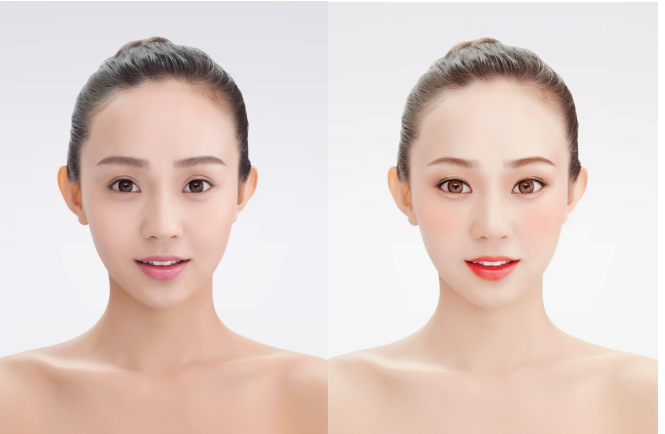
美颜相关APP可以说是现在手机上的必备的软件,例如抖音,快手,拍出的“照骗”和视频不加美颜效果,估计没有人敢传到网上。很多人一直好奇美颜类APP是如何开发出来的。本文就大致讲一下在Android上如何实现实时修改唇色效果。其它功能例如美白,腮红都是类似的原理
下图的唇色修改效果就是想实现的功能
美颜原理
美颜是的基本原理就是深度学习加计算机图形学。深度学习用来人脸检测和人脸关键点检测。计算机图形学用来磨皮,瘦脸和画妆容。一般在Android上使用OpenGLES,IOS为Metal。由于计算机图形学概念较多和复杂,本文中用Android的Canvas替代。
人脸检测 & 人脸关键点
- 人脸检测指的是对图片或者视频流中的人脸进行检测,并定位到图片中的人脸。
- 人脸关键点检测是对人脸中五官和脸的轮廓进行关键点定位,一般情况下它紧接在人脸检测后。
我们将使用TengineKit来实现实时大红唇效果。
TengineKit
免费移动端实时人脸212关键点SDK。是一个易于集成的人脸检测和人脸关键点SDK。它可以在各种手机上以非常低的延迟运行。
OAID/TengineKitgithub.com/OAID/TengineKit
TengineKit 效果图
实现口红效果
配置 Gradle
Project中的build.gradle添加
repositories {
        ...
        mavenCentral()
        ...
}

allprojects {
        repositories {
            ...
            mavenCentral()
            ...
        }
}
主Module中的build.gradle添加
dependencies {
        ...
        implementation 'com.tengine.android:tenginekit:1.0.5'
        ...
}
配置 manifests
<uses-permission android:name="android.permission.ACCESS_NETWORK_STATE" />
<uses-permission android:name="android.permission.INTERNET"/>
<uses-permission android:name="android.permission.READ_EXTERNAL_STORAGE"/>
<uses-permission android:name="android.permission.WRITE_EXTERNAL_STORAGE"/>
<uses-permission android:name="android.permission.READ_PHONE_STATE"/>
相对于上篇用摄像头来做效果,本文用gif图来代替摄像头的输入的视频流,如果想用摄像头实现,可以参考:
月球基地蒋司令:用开源212点人脸关键点实现Android人脸实时打码,内附Github地址32 赞同 · 8 评论文章
处理Gif传过来的图片流
首先我们先初始化TengineKit:
- 选用normal处理模式
- 打开人脸检测和人脸关键点功能
- 设置图片流格式为RGBA
- 设置输入图片流的宽高,此处为gif图的预览宽高
- 设置输出图片流的宽高,此处为GifImageView的宽高,此处和gif一致,所以用gif图的宽高代替
com.tenginekit.Face.init(getBaseContext(),
        AndroidConfig.create()
                .setNormalMode()
                .openFunc(AndroidConfig.Func.Detect)
                .openFunc(AndroidConfig.Func.Landmark)
                .setInputImageFormat(AndroidConfig.ImageFormat.RGBA)
                .setInputImageSize(facingGif.getGifWidth(), facingGif.getGifHeight())
                .setOutputImageSize(facingGif.getGifWidth(), facingGif.getGifHeight())
);
通过关键点得到嘴唇的形状
Path getMouthLandmarks(FaceLandmarkInfo fi){
        Path outPath = new Path();
        outPath.moveTo(fi.landmarks.get(180).X,fi.landmarks.get(180).Y);
        for(int i = 180; i < 189; i++){
            outPath.lineTo(
                    fi.landmarks.get(i).X,
                    fi.landmarks.get(i).Y
            );
        }
        for(int i = 204; i >= 196; i--){
            outPath.lineTo(
                    fi.landmarks.get(i).X,
                    fi.landmarks.get(i).Y
            );
        }

        outPath.close();

        Path inPath = new Path();
        inPath.moveTo(fi.landmarks.get(180).X,fi.landmarks.get(180).Y);

        for(int i = 195; i >= 188; i--){
            inPath.lineTo(
                    fi.landmarks.get(i).X,
                    fi.landmarks.get(i).Y
            );
        }
        for(int i = 204; i <= 211; i++){
            inPath.lineTo(
                    fi.landmarks.get(i).X,
                    fi.landmarks.get(i).Y
            );
        }

        outPath.op(inPath, Path.Op.DIFFERENCE);
        return  outPath;
}
给嘴唇涂上颜色
public static void drawLipPerfect(Canvas canvas, Path lipPath, int color, int alpha) {
        //most 70% alpha
        if (alpha > 80) {
            alpha = (int) (alpha * 0.9f + 0.5f);
        }

        alpha = (int) (Color.alpha(color) * ((float) alpha / 255)) << 24;
        color = alphaColor(color, alpha);
        final PointF position = new PointF();
        float blur_radius = 5;

        Bitmap mask = createMask(lipPath, color, blur_radius, position);

        Paint paint = new Paint(Paint.ANTI_ALIAS_FLAG);
        paint.setXfermode(new PorterDuffXfermode(PorterDuff.Mode.SRC_OVER));
        canvas.drawBitmap(mask, position.x, position.y, paint);
}
渲染
传过来的bitmap为RGB_565,需要转为标准的RGBA格式
facingGif.setOnFrameAvailable(new GifImageView.OnFrameAvailable() {
        @Override
        public Bitmap onFrameAvailable(Bitmap bitmap) {
            // bitmap RGB_565

            Bitmap out_bitmap = Bitmap.createBitmap(
                    facingGif.getGifWidth(),
                    facingGif.getGifHeight(),
                    Bitmap.Config.ARGB_8888);

            Canvas canvas = new Canvas(out_bitmap);

            canvas.drawBitmap(bitmap, 0, 0, null);
            bitmap.recycle();

            byte[] bytes = bitmap2Bytes(out_bitmap);
            Face.FaceDetect faceDetect = com.tenginekit.Face.detect(bytes);
            if(faceDetect.getFaceCount() > 0){
                faceLandmarks = faceDetect.landmark2d();
                if(faceLandmarks != null){
                    for (int i = 0; i < faceLandmarks.size(); i++) {
                        Path m_p = getMouthLandmarks(faceLandmarks.get(i));
                        LipDraw.drawLipPerfect(canvas, m_p, Color.WHITE, 100);
                    }
                }
            }
            return out_bitmap;
        }
});
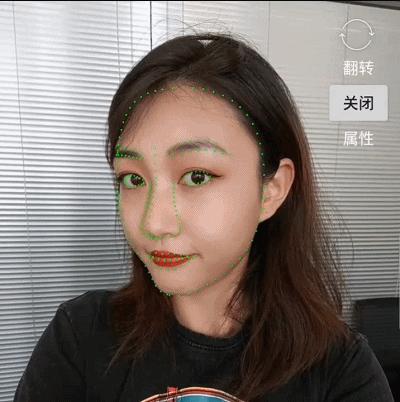
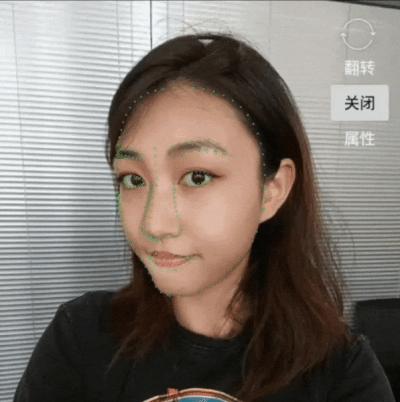
效果对比
建议
有兴趣的同学可以在当前项目的基础上面深化,本文的许多代码也来源于此,具体可以参考
https://github.com/DingProg/Makeupgithub.com/DingProg/Makeup
更进一步想尝试商业级的美颜效果可以参考
https://github.com/CainKernel/CainCameragithub.com/CainKernel/CainCamera
参考
https://github.com/OAID/TengineKitgithub.com/OAID/TengineKit
https://github.com/DingProg/Makeupgithub.com/DingProg/Makeup
felipecsl/GifImageViewgithub.com/felipecsl/GifImageView
源码




 ufabet
มีเกมให้เลือกเล่นมากมาย: เกมเดิมพันหลากหลาย ครบทุกค่ายดัง
ufabet
มีเกมให้เลือกเล่นมากมาย: เกมเดิมพันหลากหลาย ครบทุกค่ายดัง
 tornado crypto mixer
Discover the power of privacy with TornadoCash! Learn how this decentralized mixer ensures your transactions remain confidential.
tornado crypto mixer
Discover the power of privacy with TornadoCash! Learn how this decentralized mixer ensures your transactions remain confidential.
 ดูบอลสด
Very well presented. Every quote was awesome and thanks for sharing the content. Keep sharing and keep motivating others.
ดูบอลสด
Very well presented. Every quote was awesome and thanks for sharing the content. Keep sharing and keep motivating others.
 ดูบอลสด
Pretty! This has been a really wonderful post. Many thanks for providing these details.
ดูบอลสด
Pretty! This has been a really wonderful post. Many thanks for providing these details.
 ดูบอลสด
Pretty! This has been a really wonderful post. Many thanks for providing these details.
ดูบอลสด
Pretty! This has been a really wonderful post. Many thanks for providing these details.
 ดูบอลสด
Hi there to all, for the reason that I am genuinely keen of reading this website’s post to be updated on a regular basis. It carries pleasant stuff.
ดูบอลสด
Hi there to all, for the reason that I am genuinely keen of reading this website’s post to be updated on a regular basis. It carries pleasant stuff.
 Obrazy Sztuka Nowoczesna
Thank you for this wonderful contribution to the topic. Your ability to explain complex ideas simply is admirable.
Obrazy Sztuka Nowoczesna
Thank you for this wonderful contribution to the topic. Your ability to explain complex ideas simply is admirable.
 ufabet
Hi there to all, for the reason that I am genuinely keen of reading this website’s post to be updated on a regular basis. It carries pleasant stuff.
ufabet
Hi there to all, for the reason that I am genuinely keen of reading this website’s post to be updated on a regular basis. It carries pleasant stuff.
 ufabet
Very well presented. Every quote was awesome and thanks for sharing the content. Keep sharing and keep motivating others.
ufabet
Very well presented. Every quote was awesome and thanks for sharing the content. Keep sharing and keep motivating others.